
When a user clicks Log out in a frontend application, it is natural to expect the next API request made with the old access token to return 401 Unauthorized. That expectation is only correct when the API checks the authorization server for the token’s current state.
A signed JWT is normally validated locally. The API checks its signature, issuer, claims, and expiration time. It does not automatically call Keycloak after every request. Therefore, a JWT issued for five minutes can remain usable for those five minutes even after the browser logs out or Keycloak receives a revocation request.
This post demonstrates both behaviors with an Angular, Keycloak, and .NET 10 products catalog:
- local JWT validation, which is fast and accepts a valid token until expiration
- strict JWT validation with Keycloak introspection, which detects revocation on the next API call
The sample uses Authorization Code Flow with PKCE. The frontend runs on http://localhost:3000, the API on http://localhost:5001, and Keycloak on http://localhost:8080.
The Short Answer
There are three related operations:
- Frontend logout clears the application’s local session and redirects the browser.
- OIDC logout ends the user’s Keycloak browser session.
- Token revocation asks Keycloak to invalidate a token according to its revocation support.
None of these operations edits the JWT already issued to the client. The token still contains the same signed claims and expiration timestamp.
The resource server decides how to validate it:
|
|
That is why logout can succeed in the browser while a copied token still works against an API using local JWT validation.
What Is Inside a JWT?
A JWT contains three Base64URL-encoded parts:
|
|
Its payload might contain:
|
|
The exp claim is important. The API can prove that Keycloak signed the token and that it has not expired. It cannot discover a later revocation event from the token itself because the token is immutable.
A useful distinction is:
|
|
These are different questions.
What Revocation Actually Revokes
Keycloak’s revocation endpoint supports both access tokens and refresh tokens:
|
|
Revoking each token has a different effect:
- Access-token revocation marks that token as revoked at Keycloak. An API using local JWT validation still cannot see that change; it can continue accepting the signed JWT until
exp. - Refresh-token revocation prevents the client from using that refresh token to obtain another access token. It does not rewrite an access JWT that the client already received.
- OIDC logout ends the browser session and asks Keycloak to end the client session. It is not a live invalidation mechanism for APIs that only validate JWTs locally.
Therefore, a complete client logout should discard its local access token and refresh token, revoke the refresh token when the client can do so, and end the OIDC session. A resource server that needs immediate rejection must use introspection, a revocation list, or another server-side policy.
The revocation endpoint normally returns success without exposing whether the submitted token was already valid. Treat the token as unusable after a successful request and never log its value.
Keycloak Configuration
The imported realm configures a five-minute access-token lifetime:
|
|
The Angular client is public because a browser application cannot safely store a client secret. PKCE protects the authorization-code exchange. The backend introspection client is confidential and owns the secret used to call Keycloak.
In Keycloak Admin Console, the useful screens are:
- Realm settings -> Tokens: access-token lifespan is five minutes.
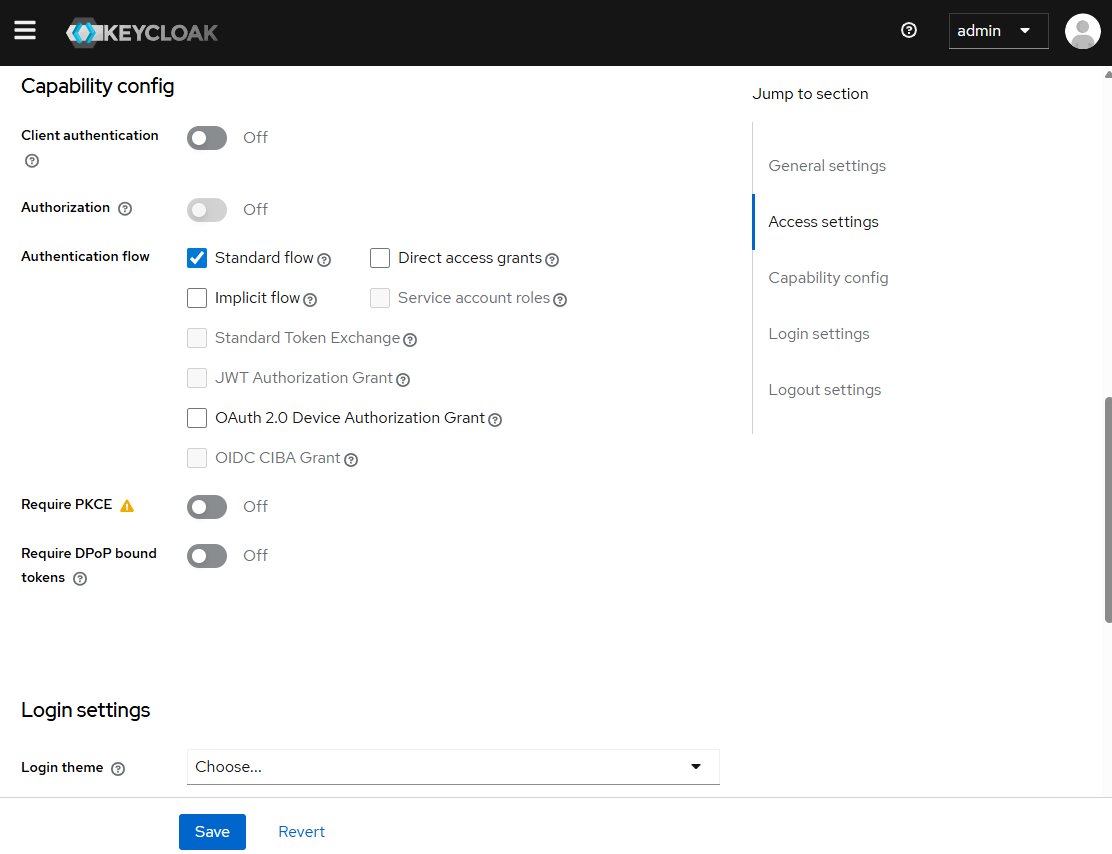
- Clients -> code-flow-client -> Capability config: Standard Flow enabled and Implicit Flow disabled.
- Clients -> api-introspection -> Credentials: confidential client secret used by the API.
Make sure the Admin Console is using the demo realm before opening
Clients. The master realm contains Keycloak’s built-in clients and will not
show code-flow-client or api-introspection. The sample imports both clients
from keycloak/realm-export.json into demo when Keycloak starts.
If demo exists but the clients are still missing, the database volume
may have been initialized before the realm export was added. Realm import is not
re-applied to an existing realm; import the file manually or recreate the local
Keycloak database volume, then select demo in the Admin Console.
The imported realm contains these settings:
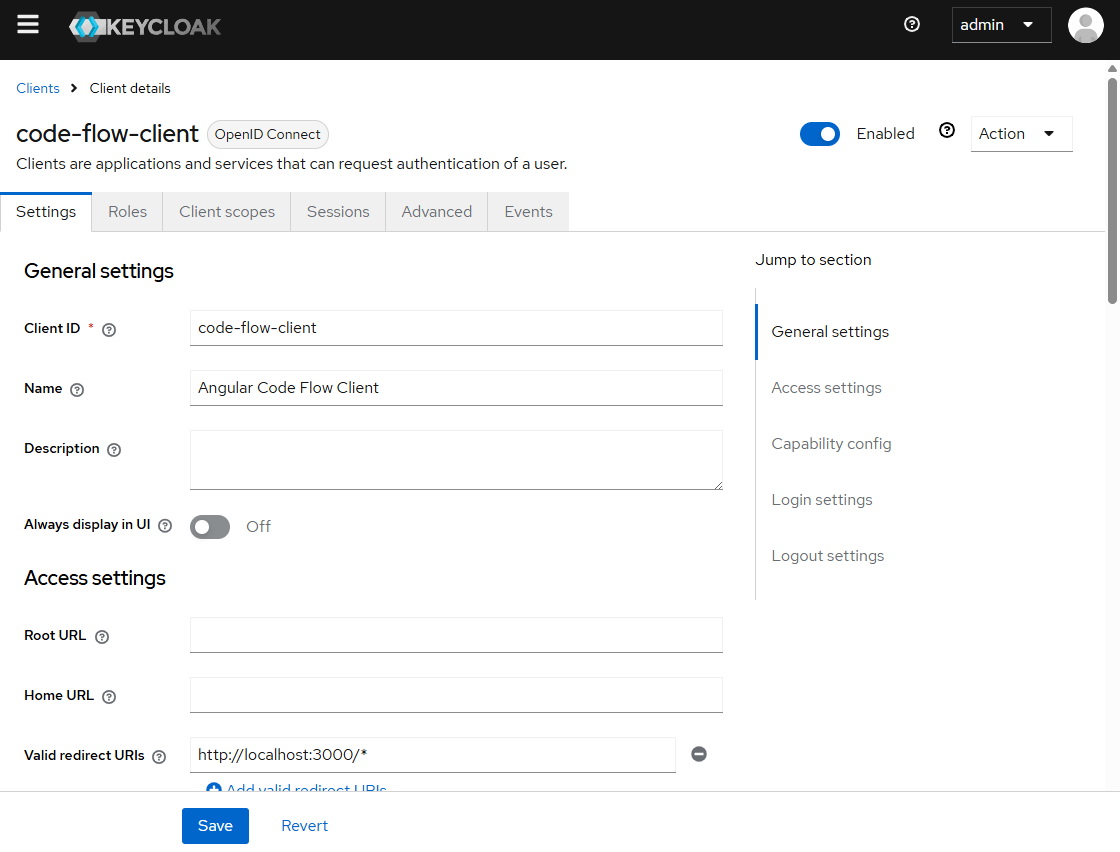
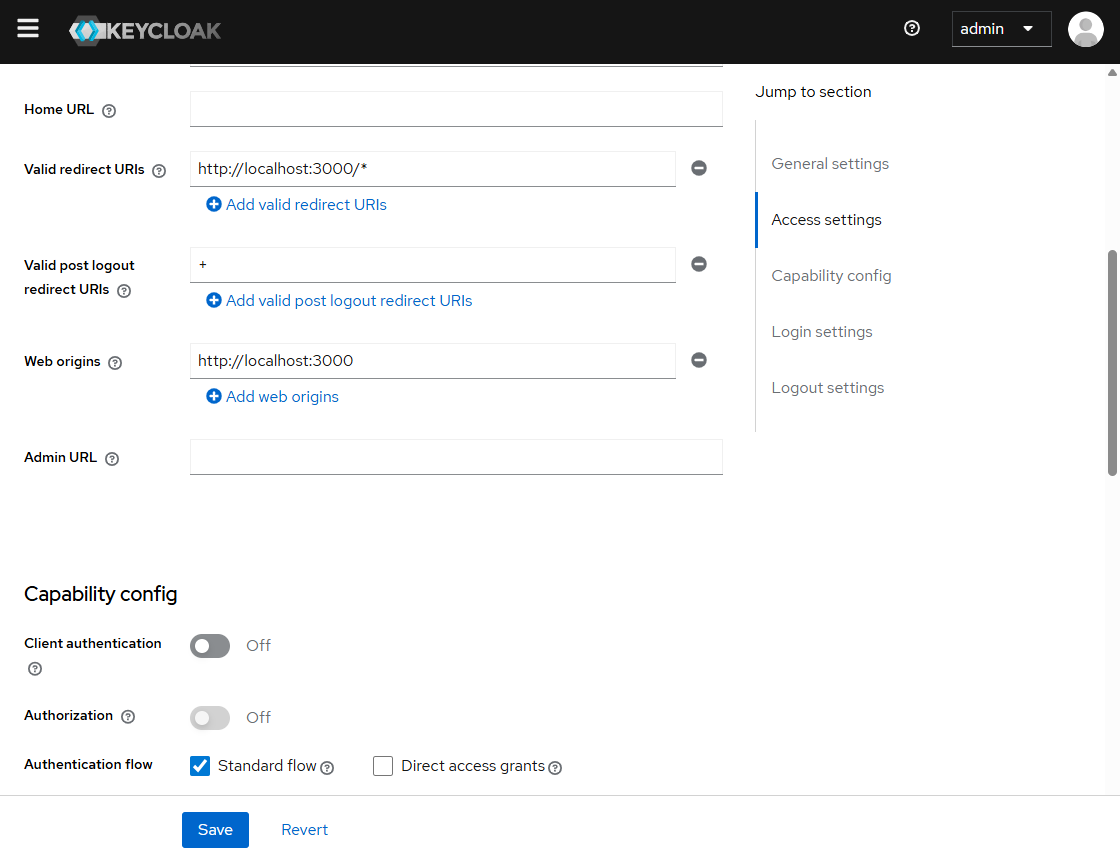
code-flow-client settings
Configure this client as a browser-only public client:
| Setting | Value |
|---|---|
| Client ID | code-flow-client |
| Client authentication | Off |
| Authentication flow | Standard flow enabled; Implicit flow disabled |
| Valid redirect URIs | http://localhost:3000/* |
| Web origins | http://localhost:3000 |
| PKCE | S256, configured by the Angular client |
The important point is Client authentication off. The Angular application cannot keep a client secret safe in browser code. Standard Flow uses the authorization-code flow, and PKCE protects the code exchange.
api-introspection settings
Configure this client as a confidential backend client:
| Setting | Value |
|---|---|
| Client ID | api-introspection |
| Client authentication | On |
| Client secret | api-introspection-demo-secret for this local sample |
| Standard flow | Disabled |
| Direct access grants | Disabled |
| Service accounts | Enabled |
The API uses this client’s secret with HTTP Basic authentication when it calls Keycloak’s token introspection endpoint. Never put this secret in Angular code or expose it to a browser.
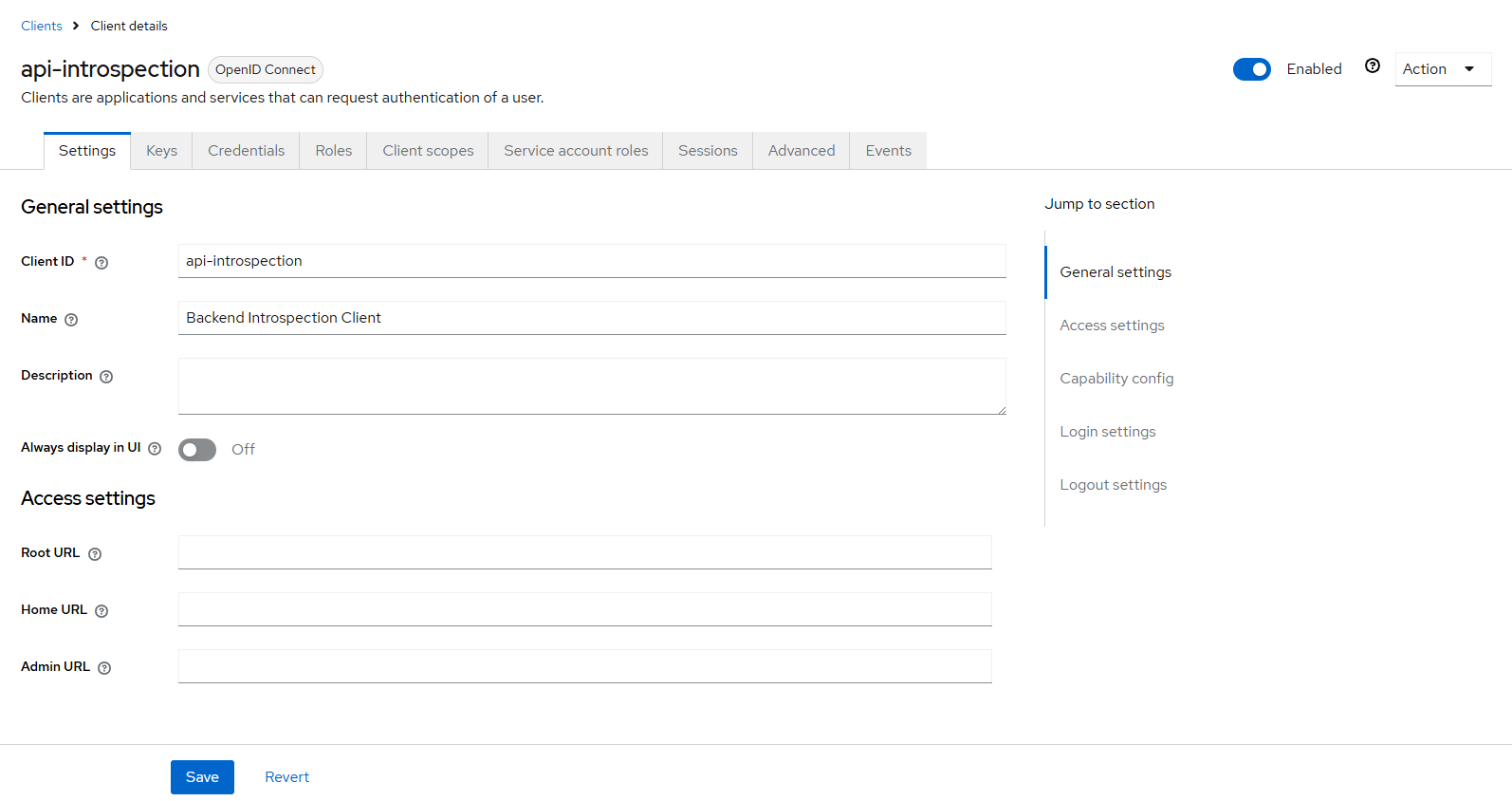
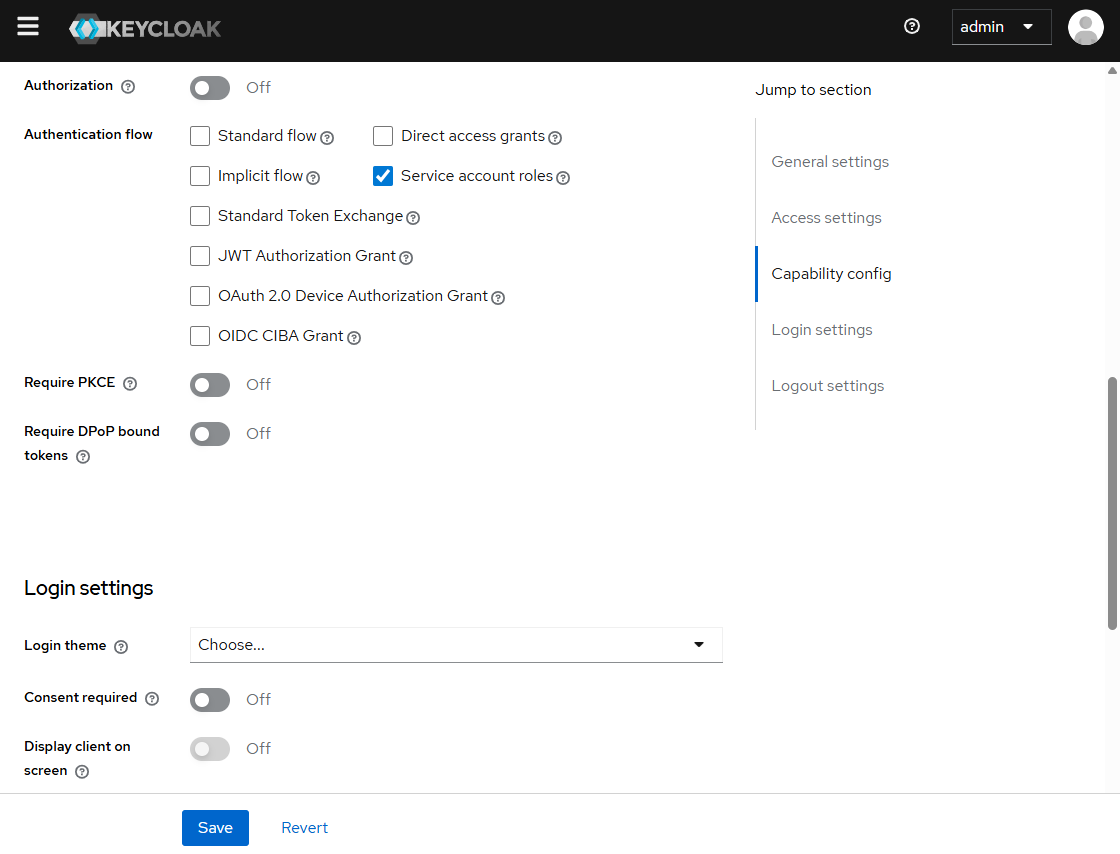
Open Clients -> code-flow-client and Clients -> api-introspection in the
demo realm to compare these screens with the imported configuration. The
api-introspection screenshot shows the client settings and the Credentials
tab where the backend secret is managed.
The sample uses sslRequired: NONE for local development. Production deployments must use HTTPS and secret storage.
Local Demo Credentials
Use these credentials only for the local sample:
| Purpose | Username | Password or token |
|---|---|---|
| Angular application | demo |
demo-password |
| Keycloak Admin Console | admin |
admin |
The Angular credentials are defined in keycloak/realm-export.json. The admin
credentials are supplied by Aspire when it starts the Keycloak container. Do not
reuse either password outside local development.
The Aspire Dashboard does not use a fixed username and password in this sample. When you run the AppHost, Aspire prints a one-time login URL containing a token:
|
|
Open that URL from the AppHost output to access the dashboard. The dashboard port and token can change each time the AppHost starts, so do not save the displayed token in the article or source code.
Angular Login and Logout
The frontend uses Authorization Code Flow with S256 PKCE:
|
|
The sample logout method revokes the access token and then ends the browser session:
|
|
This sample uses a public Angular client, so it sends client_id without a client secret. It currently revokes the access token explicitly. If the application also keeps a refresh token, revoke that token before clearing it:
|
|
For a confidential client such as api-introspection, authenticate the revocation request with that client’s credentials instead of exposing a secret in browser code:
|
|
This protects the normal browser session. The browser no longer uses the token, and the Keycloak session ends. It does not force every API to perform a new authorization-server check. A copied token can still be replayed by Postman, a test script, or another process.
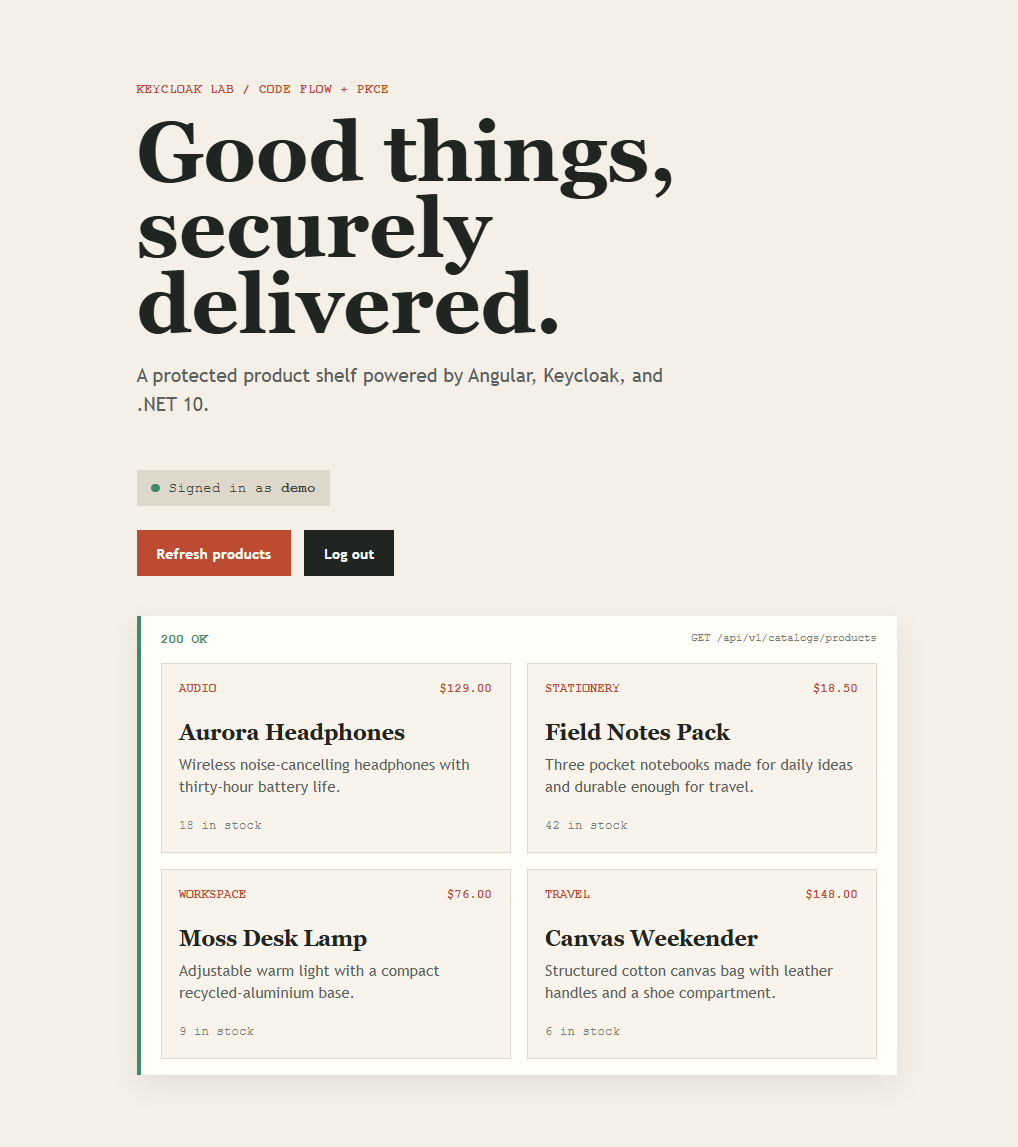
Before logout, the Angular home page can call the protected endpoint successfully:
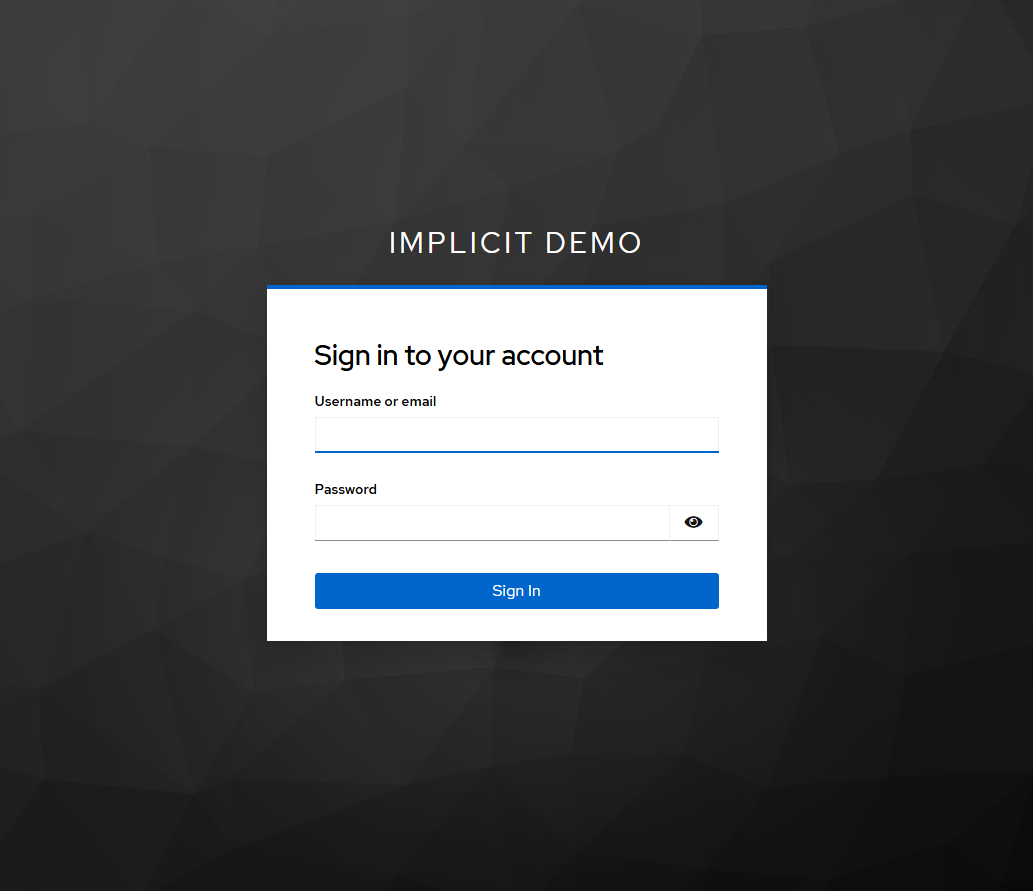
After logout, the Angular application clears its local session and redirects to the Keycloak sign-in page:
Scenario One: Local JWT Validation
The sample also contains a local-validation extension, but it is not the default. The default backend configuration uses JWT validation followed by Keycloak introspection:
|
|
The API downloads Keycloak’s signing keys and validates JWTs locally. It checks the signature, issuer, lifetime, and configured claims. It does not call the revoke endpoint or introspection for each product request.
To use local JWT validation without introspection, register this mode with:
|
|
Reproduce the behavior
- Sign in to the Angular app as
demowith passworddemo-password. - Open the products page and confirm
GET /api/v1/catalogs/productsreturns200 OK. - Copy the access token from the browser network request.
- Click Log out.
- Replay the copied token with Postman or curl.
|
|
With local validation, the request can still return the four products while exp has not passed. After the five-minute lifetime ends, the same request returns 401 Unauthorized.
This is expected. The API is verifying the token’s signed facts, not querying Keycloak’s current revocation state.
Scenario Two: Strict Revocation With Introspection
Some systems require a revoked token to stop working immediately. Examples include administration APIs, financial operations, sensitive data access, and security demonstrations.
The strict extension keeps local JWT validation and adds a Keycloak introspection call after it succeeds:
|
|
The event sends the bearer token to:
|
|
Keycloak returns an introspection document. The important field is active:
|
|
The API rejects the request when the token is inactive or revoked:
|
|
The sample’s default host uses this behavior:
|
|
Reproduce immediate rejection
- Start the API with the default configuration.
- Sign in and call the catalog endpoint with the access token.
- Confirm the first request returns
200 OK. - Click Log out, which revokes the access token.
- Replay the exact same bearer token.
|
|
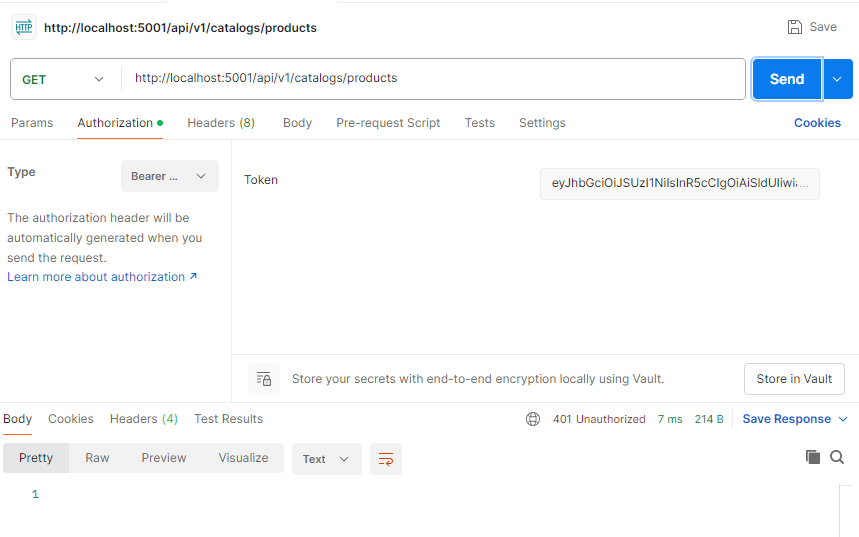
The API validates the JWT locally, then asks Keycloak for current state. Keycloak reports active: false, so ASP.NET Core authentication fails:
|
|
The same result is visible when replaying the old token from Postman or curl:
|
|
The JWT did not change. The second validation step consulted server-side state and rejected it.
Test With curl
Use curl to send the same bearer token before and after logout:
|
|
Before logout, both authentication modes return 200 OK. After logout, local JWT validation can still return 200 OK until exp, while strict introspection returns 401 Unauthorized immediately.
Change only the backend registration between runs:
|
|
Why Logout Does Not Change a Local JWT Decision
The frontend, Keycloak, and the API are separate participants:
The browser controls the user interface session. Keycloak controls its session and revocation state. The API controls whether it performs only local validation or also checks current server-side state.
Why Not Introspection Everywhere?
Introspection gives immediate revocation, but it changes the performance and availability profile of the API.
Local validation:
- signature verification is fast
- no Keycloak round trip for each request
- Keycloak is not required for every API call
- a revoked token may remain accepted until expiration
Introspection:
- revocation is detected on the next request
- every authenticated request adds network latency
- Keycloak becomes a live dependency of the API
- Keycloak outages can affect otherwise valid API requests
- the API must protect the confidential introspection secret
IHttpClientFactory manages HTTP handlers and sockets, but it does not cache introspection responses. The strict implementation still makes one Keycloak request per authenticated API request.
For most APIs, short-lived access tokens, refresh-token rotation, and local JWT validation are a good baseline. Use introspection when immediate revocation is a hard requirement.
Handling 401 in the Frontend
The frontend can react to an API 401 and clear its local session:
|
|
This improves the user experience, but it is not the security control. A caller can bypass Angular and send a bearer token directly to the API. The API must enforce authentication independently.
Security Notes
The sample is intentionally local and uses demo credentials. Production systems should also:
- use HTTPS for Angular, the API, and Keycloak
- keep confidential client secrets out of browser code
- store introspection secrets in a secret manager
- validate issuer, audience, signature, lifetime, and required claims
- keep access tokens short-lived
- rotate refresh tokens and protect refresh-token storage
- restrict CORS to known frontend origins
- define timeout and outage behavior for Keycloak
- never log complete bearer tokens
The sample disables audience validation to keep the demonstration focused. A production API should validate its expected audience explicitly.
Conclusion
A JWT does not receive a live update when a user logs out. It is a signed, self-contained credential with an expiration time. Local JWT validation can therefore continue accepting it until exp, even after the frontend clears its session and Keycloak processes revocation.
Immediate 401 Unauthorized behavior requires an additional server-side check. In this sample:
|
|
Choose local JWT validation when scalability and Keycloak independence matter most. Choose introspection when immediate revocation is more important than the extra latency and dependency on Keycloak.