
Every time you open a new Copilot chat, the model starts fresh. It does not know that yesterday you picked PostgreSQL, that you prefer Minimal APIs, or that your project is called MemorySample. Large language models are stateless — they only see what fits in the current context window, and a new session starts with an empty one.
The MCP Memory Server changes this. It is the official reference implementation of persistent memory for MCP clients. It stores facts as a local knowledge graph of entities, relations, and observations in a plain-text memory.jsonl file, and exposes tools that Copilot can call to save and retrieve those facts.
In this post, we will walk through a real VSCode workflow: we teach Copilot a few facts about ourselves and our project in one session, close the chat, open a brand-new session, and ask a question that only makes sense if Copilot still remembers the previous context. Then we will inspect the underlying file and look at what makes memory actually work well.
What You Will Build
You will teach Copilot a few facts about yourself and your project in Session 1, close the chat, open a Session 2, and ask a question that only makes sense if Copilot still remembers the previous context. Then you will inspect the underlying memory.jsonl file to see how the data is stored.
|
|
Everything in this post was verified against the real server — the tool calls, the JSON responses, and the memory.jsonl content below come from running @modelcontextprotocol/server-memory and driving it over MCP.
How the Memory Server Works
Before the step-by-step walkthrough, it helps to understand what the server actually does under the hood. The MCP Memory Server is a small Node.js process that speaks the MCP protocol over standard input/output. Copilot launches it through the mcp.json configuration and then calls its tools like any other MCP tool. The same server works with any MCP client — Claude Desktop, VSCode Copilot, Cursor — because they all speak the same protocol.
The Knowledge Graph Model
Memory is stored as a knowledge graph with three building blocks:
- Entity — a node. It has a unique
name, anentityType(for exampleperson,project,technology_stack), and a list ofobservations. - Relation — a directed edge between two entities. It has
from,to, and arelationTypewritten in active voice (for exampleworks_on). - Observation — an atomic fact attached to an entity (one fact per observation).
This is why the memory server can answer questions like “what tech stack do I prefer?” — the facts live on the John_Doe entity, and the relations tell Copilot how that entity connects to your projects and tools.
You share facts"] -->|"create_entities
create_relations"| B["memory.jsonl
entities + relations"] B -->|"read_graph
search_nodes
open_nodes"| C["Session 2
New chat"] C --> D["Contextual answer
without repeating facts"]
Storage: A File, Not a Database
The most common question is: does the memory server use a database? No. There is no database server, no connection string, and no schema migration. You cannot plug in PostgreSQL, SQLite, or MongoDB — the official server is deliberately file-based. Storage is a single plain-text JSONL file — one JSON object per line. By default the server writes memory.jsonl next to its own package files, which is why you must set MEMORY_FILE_PATH to point at a stable location inside your project.
The file has two advantages:
- Portable — copy the file and the memory moves with it. You can commit it to your repository or back it up like any text file.
- Human-readable — you can open it in any editor and see exactly what the model knows about you.
Every time Copilot calls a tool, the server reads the file, applies the change in memory, and writes the whole file back. The file is the database.
Alternatives With Database Storage
If you need more than a single JSONL file, several MCP-compatible memory servers store data in a real database or vector store:
- mem0-mcp — Mem0 is an open-source memory layer for AI apps. Its MCP server can persist facts in PostgreSQL, SQLite, or a vector store, and it supports semantic search over past conversations.
- AgentMemory — Built on Upstash Redis and vector indexes. It is designed for agent-style workflows where memory is queried by semantic similarity rather than by exact entity name.
- Context-Mode — A hosted memory service with a database backend. It keeps user facts, preferences, and project context in a managed store and exposes them to any MCP client.
The official MCP Memory Server keeps storage simple: it uses a plain JSONL file, not a database.
Why Memory Survives Across Sessions
A chat session is ephemeral — it is a window into a conversation and disappears when you close it. The memory file is not. This is the key to the whole system:
- All sessions share one file. Every Copilot chat starts the server with the same
MEMORY_FILE_PATH, so every session reads and writes the samememory.jsonl. - The file outlives the chat. When you close Session 1, the chat history is gone, but the file stays on disk with everything the model saved.
- Nothing is lost between sessions. Each tool call performs a read-modify-write: the server reads the whole file, applies your change, and writes the file back. Facts added in Session 1 are still there when Session 3 or Session 10 starts.
- Retrieval is on demand. In a new session the model does not automatically know the old facts. It pulls them back with
read_graph,search_nodes, oropen_nodes— that is how a new session “remembers” what an old session learned.
So the model is still stateless — but the memory is not. The file is the bridge between sessions, and the tools are how Copilot crosses it.
Prerequisites
- VSCode with the GitHub Copilot extension.
- Node.js installed so
npxworks. - The MCP Memory Server package:
@modelcontextprotocol/server-memory.
Step 1: Configure the Memory Server in VSCode
Open the Command Palette with Ctrl + Shift + P and run MCP: Open User Configuration (or add a .vscode/mcp.json file to your project). Add the memory server:
|
|
On macOS or Linux, replace the command with npx directly:
|
|
Replace the path with the real absolute path where you want the memory file to live, and put it somewhere stable that will not be deleted or cleaned up.
Here is what each part of the configuration means:
commandandargs— how VSCode launches the server process.npxruns the npm package; on Windows it must be wrapped withcmd /c.env.MEMORY_FILE_PATH— the absolute path of thememory.jsonlfile where all memory is stored. This is the most important line in the whole file.
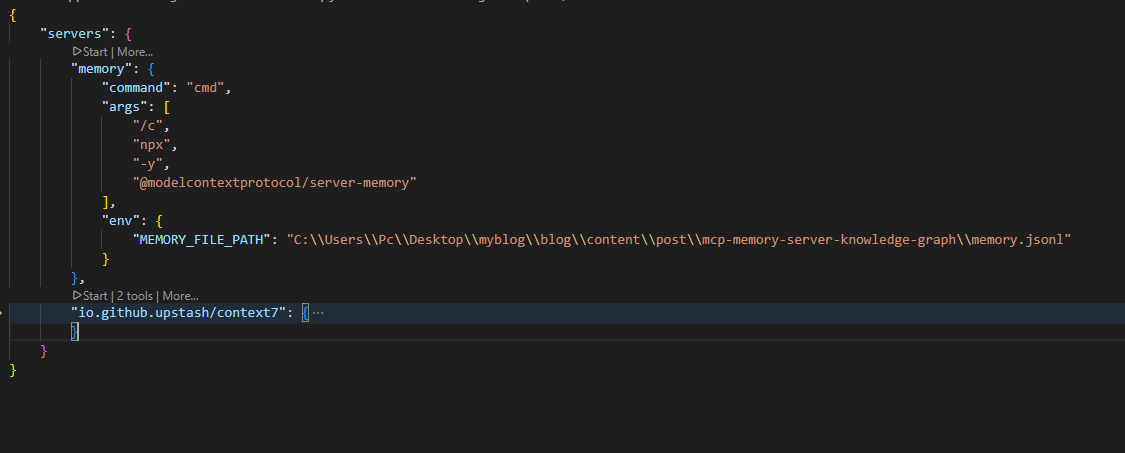
Most important detail #1: Always set
MEMORY_FILE_PATHto a stable, absolute path. If you skip this, the server writesmemory.jsonlnext to the package cache and your memory can disappear on the nextnpxinstall.
After saving, open the Copilot Chat side panel. You should see the memory server listed as an available tool. If it is missing, reload VSCode with Developer: Reload Window.
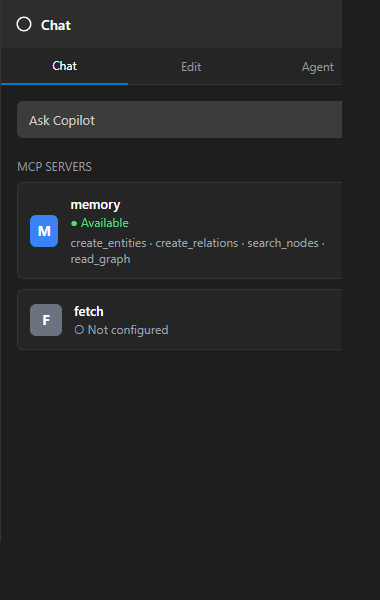
Step 2: Seed Memory in Session 1
Start a new Copilot Chat and tell it about your project. Be explicit so the model extracts the right entities.
You:
|
|
Copilot will call create_entities and create_relations on your behalf. The resulting knowledge graph looks like this:
| Entity | Type | Observations |
|---|---|---|
John_Doe |
person | Prefers vertical slice architecture; likes WolverineFx over MassTransit; uses PostgreSQL; favorite IDE is VSCode |
MemorySample_Project |
project | .NET 10 microservice; Vertical Slice Architecture with feature folders; tested with xunit.v3 |
DotNet_TechStack |
technology_stack | .NET 10; EF Core + PostgreSQL; Minimal APIs; xunit.v3 |
Relations:
John_Doe→works_on→MemorySample_ProjectJohn_Doe→prefers→DotNet_TechStack
Under the hood, Copilot sends a tools/call request to the memory server. This is the real request and response from memory-server v0.6.3:
|
|
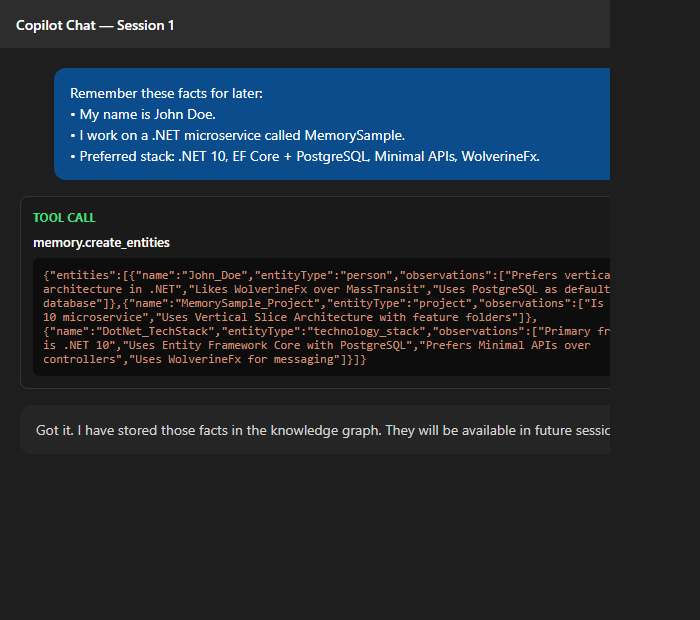
After the chat, close the panel. The data is already on disk.
Step 3: Inspect the Memory File
Open the file at MEMORY_FILE_PATH. Each line is a JSON object. Entities are stored with a type field of entity, relations with type of relation — this is the JSONL format used by the current version of the server:
{"type":"entity","name":"John_Doe","entityType":"person","observations":["Prefers vertical slice architecture in .NET","Likes WolverineFx over MassTransit for transactional messaging","Uses PostgreSQL as default database","Favorite IDE is VSCode with Copilot"]}
{"type":"entity","name":"MemorySample_Project","entityType":"project","observations":["Is a .NET 10 microservice","Uses Vertical Slice Architecture with feature folders","Is tested with xunit.v3"]}
{"type":"entity","name":"DotNet_TechStack","entityType":"technology_stack","observations":["Primary framework is .NET 10","Uses Entity Framework Core with PostgreSQL","Prefers Minimal APIs over controllers","Uses xunit.v3 for testing"]}
{"type":"relation","from":"John_Doe","to":"MemorySample_Project","relationType":"works_on"}
{"type":"relation","from":"John_Doe","to":"DotNet_TechStack","relationType":"prefers"}
This file is the entire secret. It is plain text, local, and portable. You can back it up, version it, or move it to another machine — the memory comes with it.
Most important detail #2: Memory is only as good as the file path. Treat
memory.jsonllike a small database. Back it up.
Step 4: Use Memory in Session 2
Open a new Copilot Chat. Do not repeat the project facts. Ask something that depends on them.
You:
|
|
Copilot starts by calling read_graph or search_nodes. Here is the real search_nodes call and response when we searched for WolverineFx — notice how the server returns the matching entity together with its relations:
|
|
|
|
It finds John_Doe, MemorySample_Project, and DotNet_TechStack. The answer is now contextual instead of generic.
Copilot (example response):
|
|
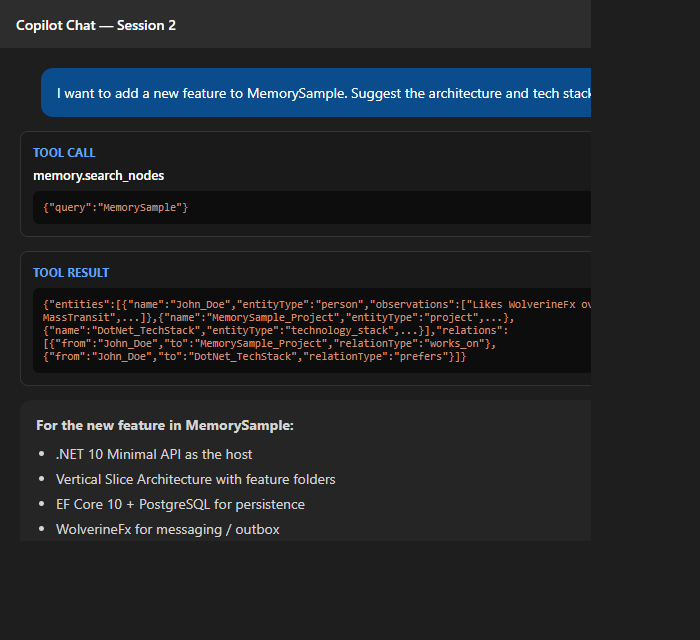
Notice that the model did not ask “What is your stack?” It answered directly because the memory server bridged the two sessions.
Step 5: Add More Facts Across Sessions
Memory gets more useful over time. In a third session, you add a new observation.
You:
|
|
Copilot calls add_observations on John_Doe. Again, the real request and response:
|
|
|
|
In a fourth session, you can ask:
|
|
Copilot searches the graph, finds the observation, and answers without you repeating the topic.
What Makes Memory Work Well
The memory server is simple, but a few patterns decide whether it helps or gets in the way. These are the most important parts of using memory.
1. Atomic Observations
One fact per observation. Good:
|
|
Bad:
|
|
Atomic facts make search precise and deletions safe.
2. Stable, Unique Entity Names
Use John_Doe instead of John. If a second John appears, the graph still works.
3. Active Voice Relations
Relations are directed. Use works_on, prefers, subscribed_to. Avoid passive forms like is_used_by where the direction is unclear.
4. A System Prompt That Triggers Memory
Without guidance, the model may not call read_graph at the start of a chat. Add custom instructions in VSCode:
|
|
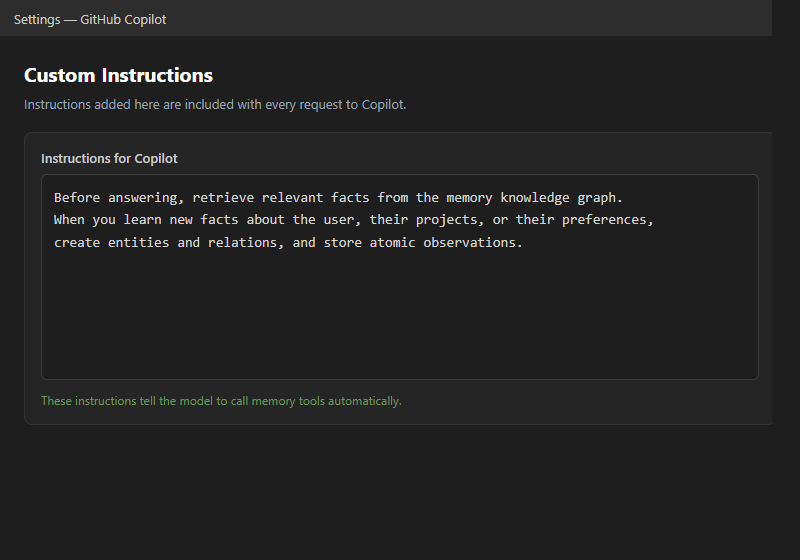
Most important detail #3: Memory does nothing unless the model is reminded to use it. A system prompt or custom instruction is required.
Common Pitfalls
| Problem | Cause | Fix |
|---|---|---|
| Memory is lost after restart | MEMORY_FILE_PATH not set or points to a temp directory |
Use an absolute path in mcp.json |
| Copilot ignores memory | No custom instruction triggers retrieval | Add a system prompt |
| Graph grows with noise | Observations are too long or duplicated | Keep facts atomic, one per line |
| Search returns wrong nodes | Entity names are too generic or change between sessions | Use stable, unique names |
Conclusion
The MCP Memory Server turns Copilot from a stateless chat into an assistant that remembers your project across days. The workflow is simple: configure the server with a stable MEMORY_FILE_PATH, seed facts in one session, and let read_graph, search_nodes, and open_nodes bring that context into every new session.
The three most important details to remember:
- The file path is everything — point
MEMORY_FILE_PATHat a stable absolute location and back it up like a database. - Atomic, well-named data — one fact per observation, stable entity names, active-voice relations.
- A prompt that triggers memory — the model only uses the tools if you tell it to.