
Introduction
Part III added a harness, planning, and human approval. The next problem is coordination: one agent should not perform every specialist task when a workflow can route work to focused agents, run independent checks in parallel, and combine their findings with traceable execution.
This article builds a support-ticket workflow with Microsoft Agent Framework concepts and .NET. A classifier identifies the main category, billing and technical specialists investigate independently, and a synthesizer produces the next recommendation. OpenTelemetry sends workflow spans and metrics through an OpenTelemetry Collector to Tempo and Loki, while Grafana provides the operational view.
Real-World Scenario: A Checkout Ticket
A support customer writes:
|
|
One general-purpose agent could answer, but it would mix payment policy, technical diagnostics, and escalation rules. A workflow makes those responsibilities explicit:
- Classify the ticket as billing-led.
- Ask billing and technical specialists for independent findings.
- Run those independent checks concurrently.
- Synthesize one support recommendation.
- Emit traces and metrics for each stage.
The workflow does not authorize a refund. Part III’s approval gate remains the boundary for side effects. Part IV coordinates analysis and makes execution observable.
Following the Ticket Through Workflow
For ORD-1001, each executor returns a focused finding instead of a vague conversational reply:
| Step | Finding | Decision |
|---|---|---|
| Classifier | Billing-led, with a technical symptom | Run both specialists |
| Billing specialist | Two authorization records share the same order ID; no refund executed | Verify settlement status before refund |
| Technical specialist | Checkout returned HTTP 500 after payment submission | Check idempotency and correlation logs |
| Synthesizer | Payment may be duplicated, but evidence is incomplete | Ask an operator to review before refund |
This example shows why fan-out and fan-in are useful. Billing can inspect payment records while technical support checks the failed request. The synthesizer sees both findings, preserves the uncertainty, and recommends approval rather than silently performing a financial action.
If the technical specialist times out, the workflow should return a partial-result state or retry according to policy. It should not present an unverified “duplicate charge” as fact. A trace makes that distinction visible: the operator can see classifier, specialist, timeout, retry, and synthesis spans under one workflow trace.
1. Workflows: Explicit Execution Graphs
What problem do workflows solve?
An agent run is useful for a conversation. A workflow is useful when work has multiple steps, branches, parallel tasks, retries, checkpoints, or human input. It represents execution as a graph instead of hiding every decision inside one prompt.
In Microsoft Agent Framework, executors are the graph’s work units. An executor can be ordinary application code, a function, or an AI agent. A workflow connects executors and passes messages between them.
The sample uses an IWorkflowExecutor interface so the boundary is easy to test. In a larger application, map the same roles to WorkflowBuilder, MessageHandler, and framework workflow execution APIs. Keep business rules inside executors and graph wiring in the workflow composition layer.
Executor design
A good executor has a narrow input and output contract:
|
|
The contract makes it possible to replace a deterministic specialist with an AIAgent, an HTTP service, or a durable activity without changing the workflow’s external API.
2. Multi-Agent Systems: Divide Responsibility
Why use multiple agents?
Multiple agents help when tasks need different instructions, tools, knowledge, or ownership. A billing specialist should not receive technical credentials, and a technical specialist should not decide payment outcomes.
| Agent | Responsibility | Example output |
|---|---|---|
| Classifier | Select category and route work | billing |
| Billing specialist | Interpret payment signals | Review authorization; avoid retries |
| Technical specialist | Interpret failures | Collect error code and correlation ID |
| Synthesizer | Combine findings | One customer-facing recommendation |
Multi-agent does not mean “give every agent every tool.” Apply least privilege per agent, validate messages at every boundary, and keep final business authority in application services.
Common orchestration patterns
Microsoft Agent Framework supports several useful topologies:
- Sequential: one executor’s output becomes the next executor’s input. Use for classify, enrich, then summarize.
- Concurrent: independent specialists run together, then a fan-in executor aggregates findings. The sample uses this pattern.
- Group chat: several agents take turns under an orchestrator and termination rule. Use when discussion is itself valuable, but bound turns and tokens.
- Handoff: an agent transfers ownership to a directed specialist. Use for clear routing such as support to billing.
- Manager-driven: a manager assigns specialists, monitors progress, and replans. Use for open-ended work with explicit limits.
Choose topology from dependency structure, not from the number of models. Parallelism is useful only when tasks are independent and downstream code can handle partial or conflicting results.
3. Parallel Execution and Synthesis
The sample fans out to both specialists and waits for both results:
|
|
This is safe here because specialists are read-only and independent. It would be unsafe to run two payment writes concurrently without idempotency, ordering, and a transaction design.
The synthesis step should preserve provenance. Return which specialist produced each finding, include confidence or evidence references when available, and never let a generated summary erase a conflicting fact. For long-running work, persist the fan-out results before synthesis so a failed synthesizer can resume without repeating external calls.
4. Checkpoints and Human-in-the-Loop Workflows
Part III paused a refund before execution. A workflow can pause for the same reason through a request port or approval event, then resume from a checkpoint after the user or operator responds.
File checkpoint storage can suit a local single-process demo. Distributed production workflows need durable storage, optimistic concurrency, expiration, and a strategy for duplicate resume requests. Durable Task integrations are appropriate when execution must survive process failure and scale across workers.
Checkpointing stores state; it does not automatically provide authorization, distributed locking, idempotency, or a correct retry policy. Add those deliberately.
5. Observability: See Agent Execution
Agent systems have more failure points than ordinary request/response code: model latency, token usage, routing decisions, executor failures, tool calls, fan-in waits, and context growth. Logs alone cannot show their causal relationships.
Use three signals:
- Traces: one workflow span with child executor spans and correlation IDs.
- Metrics: run count, duration, failure count, token usage, and per-agent latency.
- Logs: structured decisions, errors, approval events, and selected business identifiers.
The sample creates an ActivitySource named AgentWorkflows.Workflow and a Meter with agent.workflow.runs and agent.workflow.duration. It adds executor IDs and workflow categories as span attributes while avoiding ticket text and sensitive payment data.
|
|
Register the source and meter with OpenTelemetry, then export OTLP to the Collector:
|
|
The Collector separates application instrumentation from storage backends. It exports traces to Tempo and logs to Loki. Grafana queries both data sources, so an operator can move from a slow workflow trace to related logs without coupling application code to Grafana.
Do not export prompts, tool arguments, customer payment data, or full model responses by default. Use redaction, sampling, access control, and retention policies. Avoid double-instrumenting the same model call because duplicate spans make latency and cost analysis misleading.
The Sample Application
The complete sample contains:
SupportWorkflowwith classifier logic, two specialist executors, fan-out, and synthesis.SupportAgentusingMicrosoft.Agents.AIfor optional model-based summarization.ActivitySourceandMeterinstrumentation.- Docker Compose infrastructure based on the existing blog observability sample:
- OpenTelemetry Collector
- Grafana
- Loki
- Tempo
- Prometheus
- Aspire AppHost for starting the same services during local development.
- Unit tests for workflow classification and specialist output.
- API integration tests for validation, health, and workflow results.
Start the observability stack and API:
|
|
Open Grafana at http://localhost:3000 using admin / admin. Send a ticket:
|
|
The response contains the category, both specialist findings, and the synthesized recommendation. The trace contains the workflow and executor spans.
Live Grafana Preview
After running the sample, Grafana shows workflow metrics, structured Loki logs, and trace IDs connected to Tempo. The dashboard refreshes every five seconds. Select a trace ID from the log panel or open the Tempo link to inspect the complete workflow span tree.
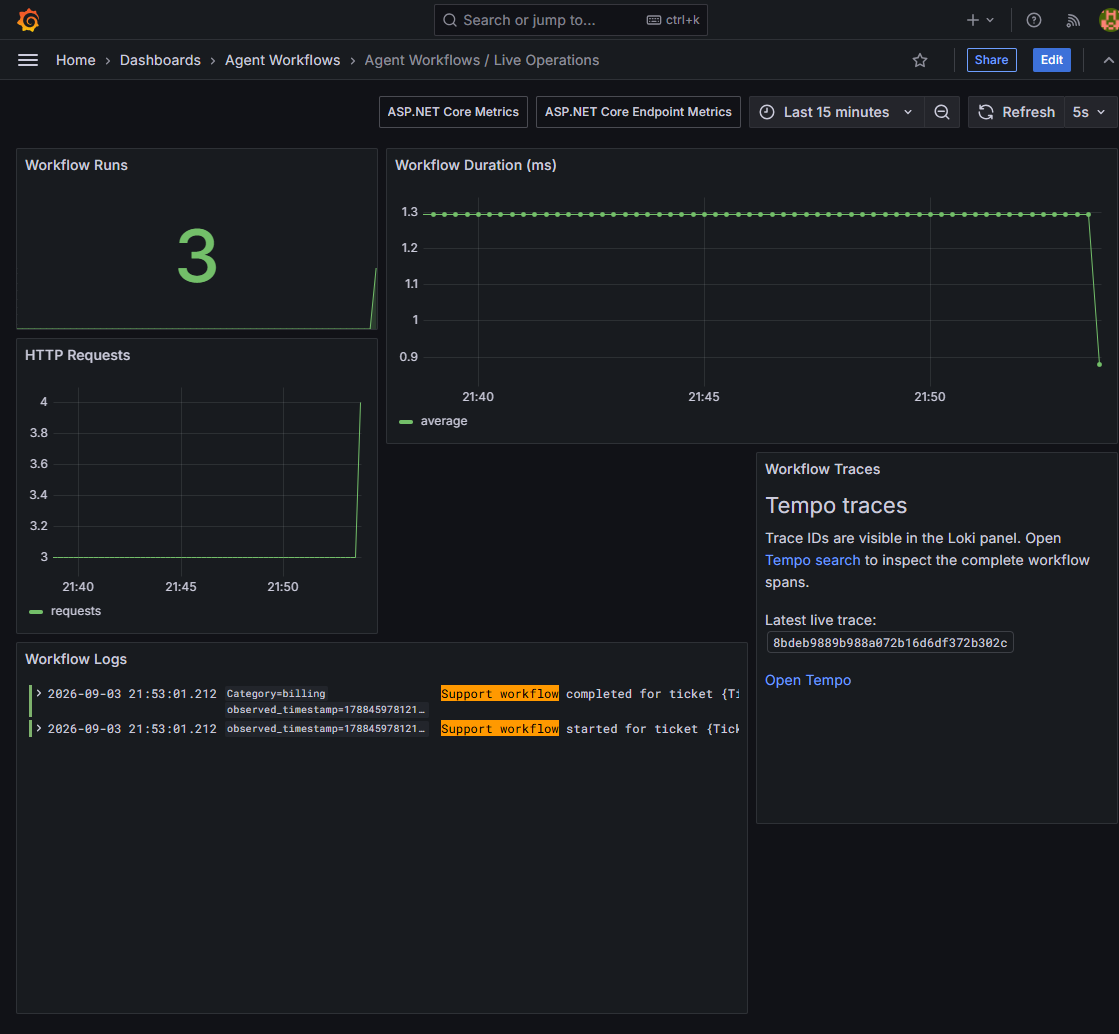
The official ASP.NET Core metrics dashboard and ASP.NET Core endpoint dashboard are linked from the workflow dashboard during local preview.
Run tests:
|
|
Production Checklist
- Select sequential, concurrent, group-chat, or handoff topology from actual dependencies.
- Give each agent only tools and context required for its role.
- Bound turns, fan-out size, tokens, latency, and total cost.
- Persist checkpoints and intermediate results for long-running workflows.
- Add idempotency and reconciliation around every side effect.
- Define behavior for partial, conflicting, timed-out, and failed specialist results.
- Propagate correlation IDs through agents, tools, and remote A2A calls.
- Redact sensitive prompts, tool arguments, and customer data from telemetry.
- Monitor token usage, model latency, executor duration, error rate, and queue age.
- Test topology, cancellation, checkpoint resume, duplicate messages, and approval rejection.
Conclusion
Workflows make multi-step agent behavior explicit. Multi-agent systems divide responsibility into focused specialists, and concurrent orchestration reduces latency when work is independent. Checkpoints and approval events make long-running execution resumable, while OpenTelemetry gives operators the evidence needed to debug it.
The progression across this series is deliberate: Part I introduced the agent boundary, Part II added tools and knowledge, Part III added controlled planning and approval, and Part IV coordinates specialist work while making its behavior observable. The model supplies useful reasoning; workflow code, authorization, persistence, and telemetry keep that reasoning accountable.